LookBook showroom · beta

A browseable showroom for your team's design patterns.

LookBook captures patterns from Figma into a private, workspace-scoped gallery — searchable, taggable, shareable as a URL. No accounts. No second tool to learn.

Captures from Figma

Plugin lives where you already work.

Shareable as a URL

Send a link, paste an invite, done.

No new accounts

The invite code is the credential.

Your Supabase

You own the data, end to end.

//HOW IT WORKS03 steps

Three steps from a Figma frame to a shareable showroom.

LookBook stays out of your way. The plugin is the only place you write data; everything else is a read-only view.

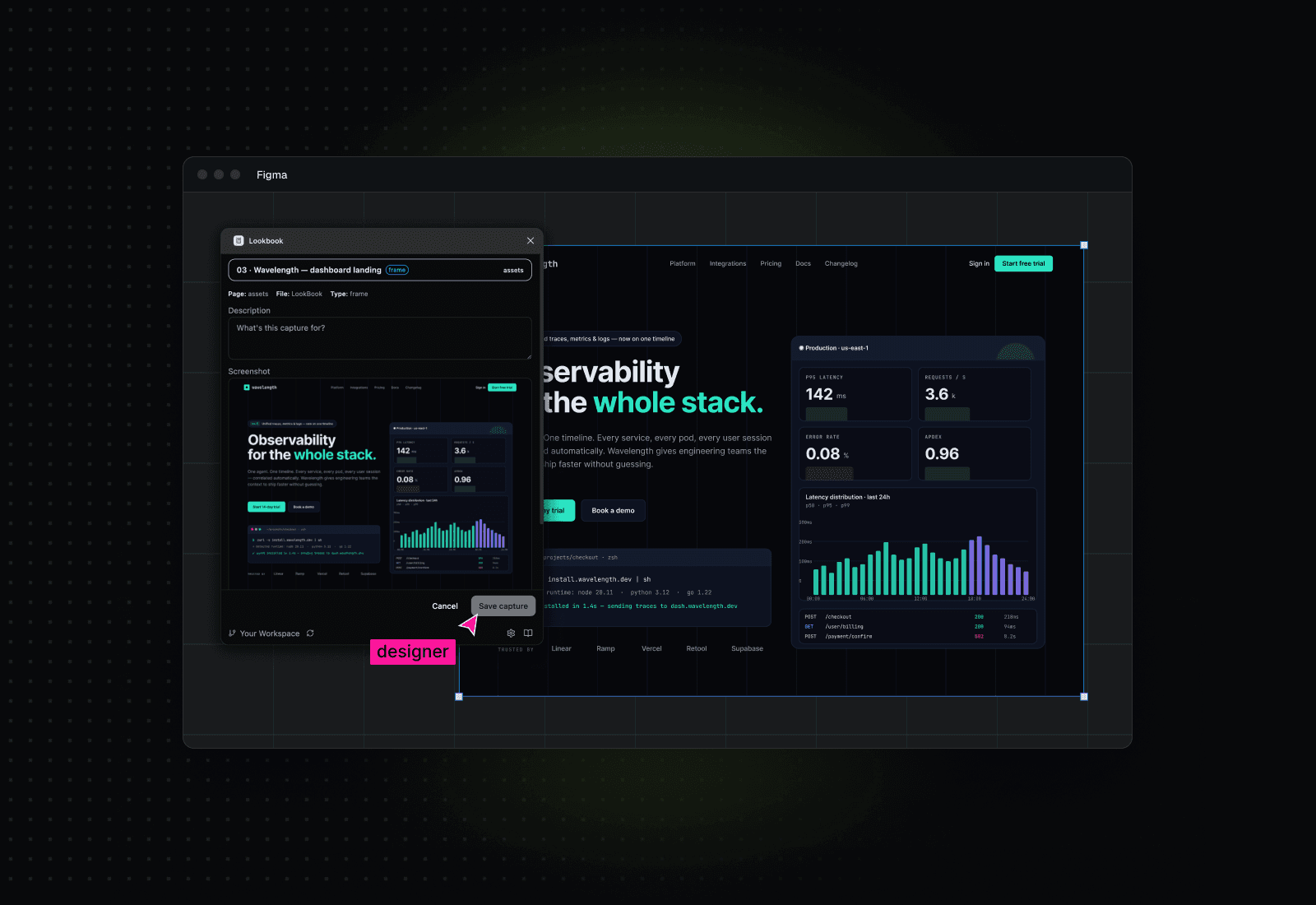
Capturing a frame from inside the Figma plugin
01IN FIGMA

Capture frames as you design.

Select any frame, open the LookBook plugin, add a title and tags, hit capture. The screenshot, source file, page, and node ID get stored to your own Supabase.
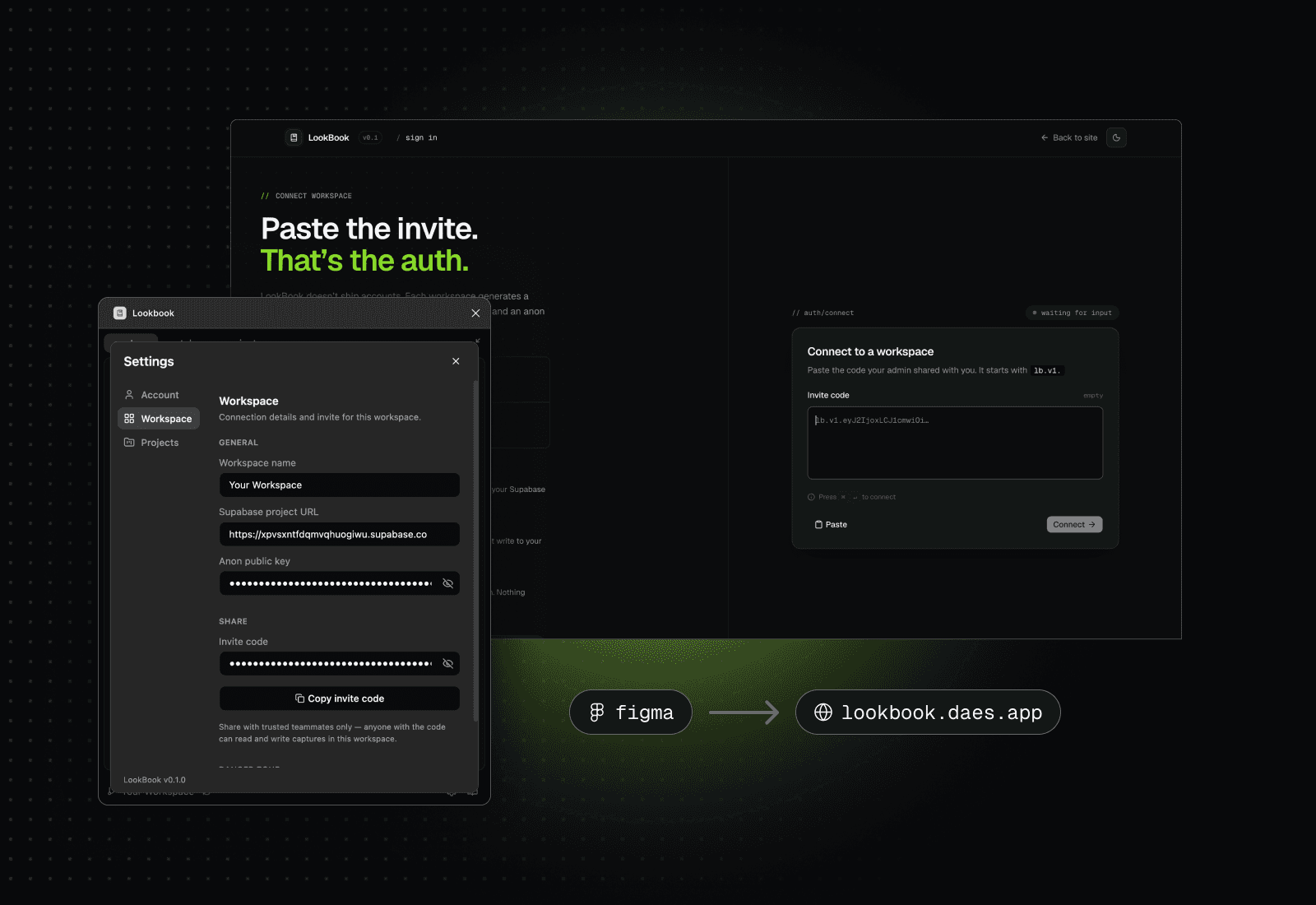
Pasting an invite code in the browser to connect
02IN THE BROWSER

Paste an invite, you’re in.

An admin generates an lb.v2.… invite in the plugin and shares it. Teammates paste it once into the webApp; credentials live only in their browser.
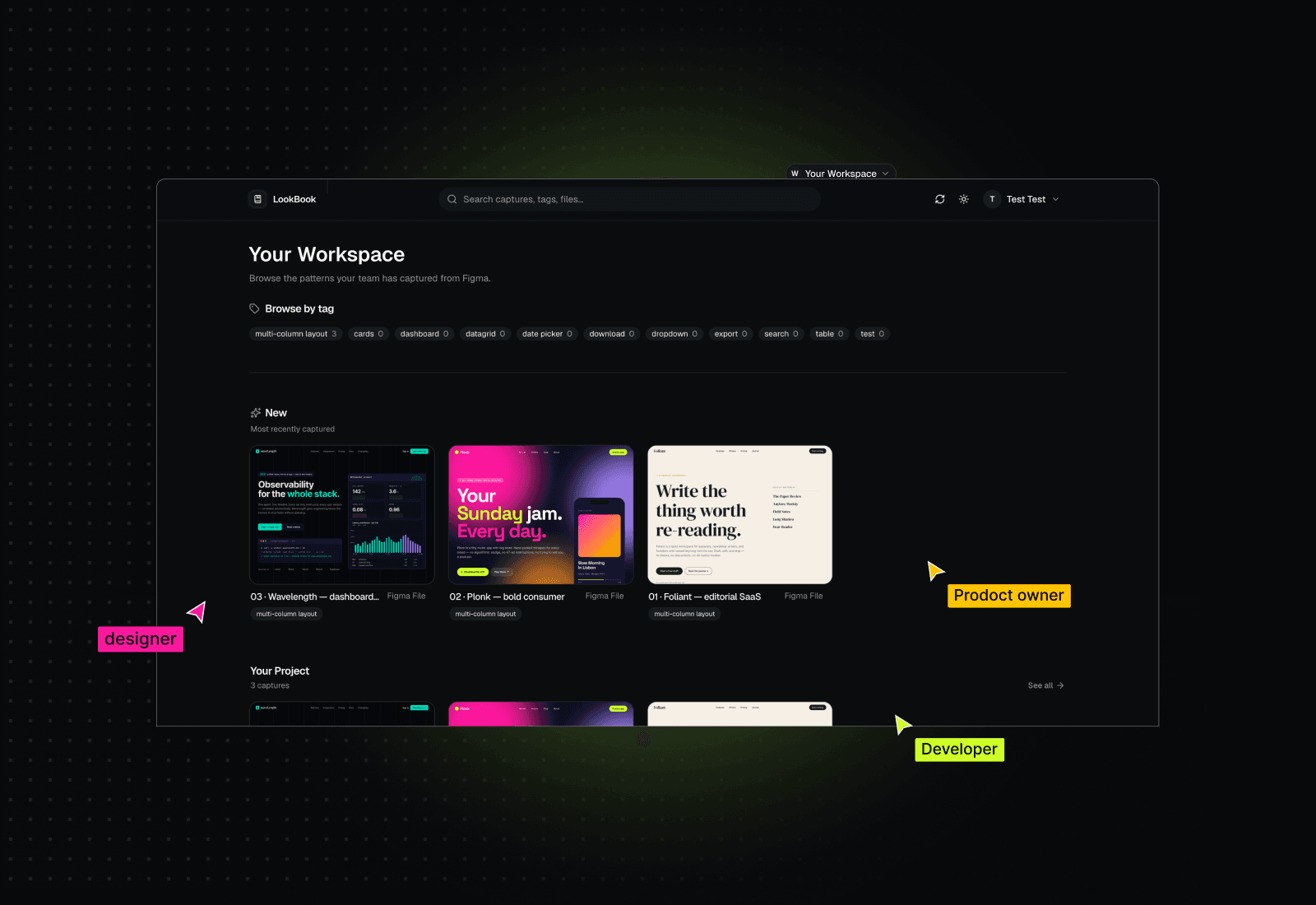
Browsing the pattern showroom with tag filters and deep links
03ANYWHERE

Browse, filter, deep-link back to Figma.

Tag clouds, per-project carousels, instant substring search. Click a card to see metadata, or hover for a one-click “Open in Figma” deep link straight to the source node.

//FEATURES06 capabilities

Small surface. Sharp tools.

v0.1 is intentionally small — prove the loop, then add. Everything below ships today.

01 — browse

Tag cloud, sorted by use

Every tag in your library shows up as a chip with its capture count, ordered most-used first. The patterns you reach for most are right at the top.

02 — browse

Per-project carousels

One horizontal row per Figma file with active captures, newest first. Scan a project’s history without leaving the start page.

03 — integration

One-click back to Figma

Hover any card to surface an “Open in Figma” button — a deep link straight to the original node, not the file root. No more hunting.

04 — search

Instant substring search

Header search filters titles, tags, file names, and page names live (~150 ms). Replaces the carousels inline while a query is active.

05 — sync

Sync on demand

The sync button invalidates the cache and refetches. Capture in Figma, switch tabs, click sync — your new pattern is already there.

06 — security

RLS is the boundary

The browser hits Supabase directly with the workspace’s anon key. Row-Level Security policies — not the client — decide what gets returned.

//A look inside/start

A simple solution to a common problem

One screen surfaces every entry point — tags, recents, projects. Nothing else to learn.

LookBook
Search captures, tags, files…⌘K
WWorkspace

Your Workspace

Browse the patterns your team has captured from Figma.

Browse by tag

onboarding24empty state18pricing14paywall11settings9composer8filters64045auth5tooltip4toast3slider2

New

Most recently captured

See all →
Stripe paywall A/B
checkout.fig · 2d ago
Empty inbox
main.fig · 3d ago
Onboarding 02
flow.fig · 4d ago
Tag picker variant
plugin.fig · 5d ago
Save toast
system.fig · 6d ago
//GETTING STARTED08 steps · ~10 min

From zero to first capture in five minutes.

Tap a step to see what it looks like. You'll need a Supabase project, the Figma plugin, and a couple of free afternoons — most teams already have the first two.

//FAQ10 questions

Honest answers about a small product.

Can’t find what you’re looking for? Email benxenb@mailbox.org.

What is LookBook?
A read-only showroom of patterns your team has captured from Figma. The plugin lives in Figma and writes; the webApp is just a browser for what’s already there. Think “Mobbin, but for the screens your own team has shipped.”
How is LookBook different from a Figma library?
A library defines what a component should be. LookBook records how patterns actually appear in your product — across files, projects, and time. They’re complementary: the library is the spec, LookBook is the receipt.
How is LookBook different from Mobbin?
Mobbin shows you how other companies design. LookBook shows you how yours does. Same idea — browseable patterns — applied to your own work, with deep links back to the source frame in Figma.
Do I need a LookBook account?
No. There are no accounts, no signups, no emails. Workspace access is gated entirely by an invite code that bundles the credentials to your Supabase project.
Do I need a Figma account to browse the webApp?
No for browsing. You only need Figma if you want to capture new patterns (which happens in the plugin) or click the “Open in Figma” deep link on a capture (which needs Figma access to the source file).
Where is my data stored?
In your own Supabase project — your billing, your row-level security policies, your control. The webApp is a static SPA; there’s no LookBook backend in the path. Screenshots live in a private storage bucket and are served via on-demand signed URLs.
Can someone outside my team see my captures?
Only if they have your invite code. The code carries an anon Supabase key scoped by your RLS policies — treat it like a password. We deliberately keep the code out of the URL so it doesn’t end up in browser history.
What does the invite code actually do?
Each workspace generates a single lb.v2.… string — a short pointer to the workspace, with no key in the code itself. Pasting it fetches the Supabase URL and anon key and stores them in localStorage; the browser talks to Supabase directly from then on. RLS is the boundary, not the client.
How much does it cost?
Free during the v0.1 beta. No paid version planned.
//READY WHEN YOU ARE

Put your team’s patterns
somewhere they can find them.

Install the plugin, capture a frame, send the link. That’s the whole loop.